
Introduction
As a member of this sharing community, it is your turn to know the blessing of receiving shares. This article provides information about locating notifications and reviewing the details of the Share amount you received.
Information
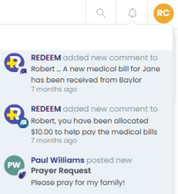
In the Member Center, on the Share Stream page, select the bell icon to see a list of notifications. 
Note: Notifications are for more than just receiving a Share. The following are types of notifications you might receive (not exhaustive):
- Received bills
- Submitted bills
- Sent Shares
- Public Announcements
- Allocations posted
When you select the bell icon, all notifications will display. You might need to scroll through the list to locate the received Share notification.
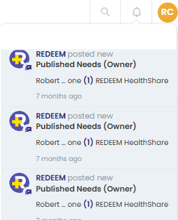
A received share notification will read: Published Needs (Owner).
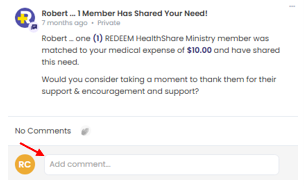
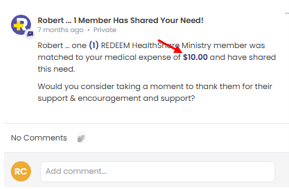
When you select one of the notifications, the details of the notification will display:
- In the Add Comment field, you can write a thank you note to the member who sent his or her Share amount.
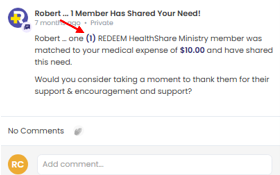
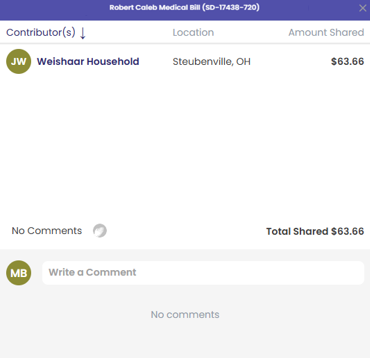
- When you select the number inside the parentheses, it will display and provide the sending member's household name and city and state of residence.
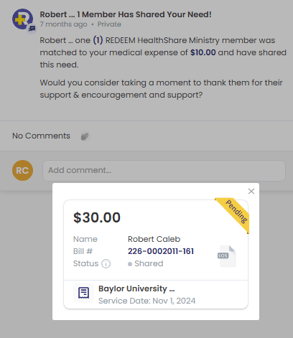
- When you select the dollar amount, it will display the allocated bill you submitted.
References
To review a record of the Shares you sent in the past, see Accessing Your Share History.