
Introduction
REDEEM HealthShare prefers that as the Sponsor of a Group, you complete the Sponsorship Registration because you must sign and date the declarations and disclosures.
During the registration process, you may designate someone to be the Group Administrator.
Procedure
To complete registration, follow these steps:
- Select the Sponsorship Registration link to access the application. The Sponsor Center screen will open.
- At the lower right of the screen, select Begin Registration. The Register a Sponsoring Entity screen will open.
- Type the information in all the required fields:
- Select Next. The Designate an Authorized Representative screen will open.
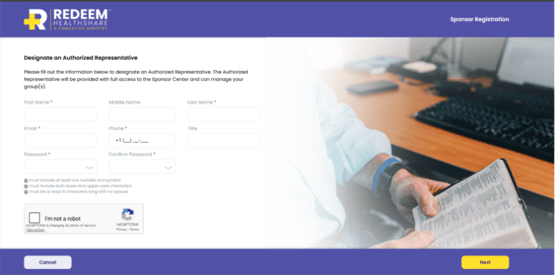
- Type the Authorized Representative’s information in all the required fields.
- Select the ReCAPTCHA checkbox.
- Select Next. The Get a Quote (Forecast Costs) screen will open.
- If you want to get a quote, see Get a Quote for a Sponsorship Group, otherwise continue with the next step.
- The member information you use in getting a quote automatically adds those members to your Sponsored Group.
- To bypass the quote option and continue the registration process, at the lower right of the screen, select Skip. The Create Sponsored Group screen will open, and you can:
- Add a group within the Sponsorship.
- Add a Group Administrator. This is beneficial if you do not manage the group payments.
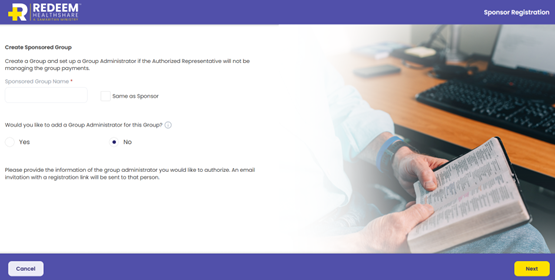
- In the Sponsored Group Name field, type a group name or select Same as Sponsor.
- If you want to add a Group Administrator, then:
- Select Yes. Go to step 11.
- Select No. Go to step 12.
- Type the Group Administrator’s information in the required fields.
- Select Same as Sponsor.
- Select Next. The Add Payment Options screen will open.
- Type the account information in the required fields.
- Select Next. The Declarations & Disclosures screen will open.
- Read and confirm your agreement with the declarations.
- Select the checkbox beside each declaration to agree.
- Type your name as your signature and the date.
- To complete the registration, select Submit.
As the Sponsor of a Group, you must sign the declarations and disclosures for the Group. In addition, each individual group member must also sign the declarations and disclosures when he or she applies.
Tips
The Sponsorship login is for administrative purposes. If you as the Sponsor will also be an individual member of the group, he or she will need a separate login for his or her personal REDEEM® HealthShare membership.
As a member of REDEEM HealthShare, reading and understanding the Sharing Guidelines is important.