
Introduction
Prayer requests allow for meaningful acts of ministry and invite others to pray with you and for you. This article explains how to submit and update private prayer requests and to submit public prayer requests to your fellow REDEEM community.
Depending on your preference for prayer, see one of the following sections for further instructions:
- Submit Private Prayer Requests
- Update Private Prayer Requests
- Submit Public Prayer Requests
Procedure
Submit Private Prayer Requests
If you choose to share, members matched to share your need can see your prayer request in their Share Stream. To submit a private request, follow these steps:
- Sign in to the Member Center. Your Household Prayer Request option automatically displays at the top of your Share Stream.
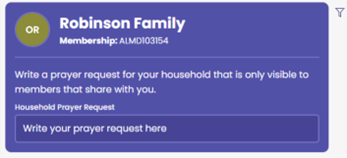
- In the Write your prayer request here field, type your request.
- Click Submit.
Updating Private Prayer Requests
After 60 days, you’ll receive prompts to update your prayer request. To update your request, follow these steps:
- Sign in to the Member Center.
- From your Household Prayer Request option, click Update.
- Type your updated request in the Household Prayer Request.
Note: When submitting any kind of bill, you will get a prompt to update your current prayer request. If your doctor submits a bill via EDI, you will see a similar prompt when you next log in. You can update and submit or cancel out of the prompt.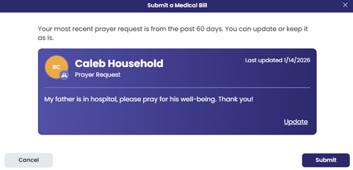
-
Click Submit.
Submit Public Prayer Requests
When you sign in to the Member Center, the system defaults to the Share Stream page. To submit a public prayer request (visible to all members who access their Member Center), follow these steps:
- In the General Inquiry option click the Post Type drop down option.
- From the options, select Prayer Request.
- Type your prayer request.
- Click Post.