
Introduction
This article provides an overview of your Share Wallet Balances and your Funding Notice.
Information
The Member Center is the central place to manage your membership and to see your account information and your sharing details. The information below explains the terms and definitions of the balance types noted in the Member Center.
To see your Dashboard, follow these steps:
- Sign in to the Member Center.
- In the navigation menu, select Sharing.
- From the options, select Dashboard. The Dashboard screen will display.
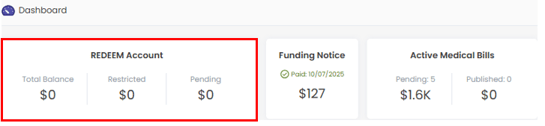
The list below provides the definition for each term displayed in the REDEEM Account section.
- Total Balance – The sum of the pending, restricted, and available balances in your Share account.
Note: If you hover over the Total Balance amount, a tooltip displays your Available Balance. The Available Balance is the Total Balance minus the Pending Balance minus the Restricted Balance. - Pending – The sum of electronic funds transfers (EFT) initiated but not yet posted to your Share Account.
- Restricted – The sum of funds credited to your Share Account for the purpose of paying other members eligible medical bills.
- Total Balance – The sum of the pending, restricted, and available balances in your Share account.
References
-
For more information about the member-to-member sharing process and why the amount you share with other members may vary, see Understanding Your Share Notice.
-
For a detailed breakdown of your monthly contribution which can help you understand how your share is allocated and the purpose behind each line item, see Finding and Viewing Your Funding Notice.
-
For a complete list of definitions, see Guidelines – 8 Glossary of Terms.
As a member of REDEEM® HealthShare, reading and understanding the Sharing Guidelines is important.