
Introduction
As the REDEEM™ Group Administrator, you must verify a Group Sponsor Authorized Representative or Group Administrator before discussing active Group Sponsorship details with that person. This article provides you with instruction for locating details of this information.
Procedure
To validate an Authorized Representative or Group Administrator, follow these steps:
- In the HubSpot search field, type the Sponsorship or Group Name. Search results will appear.
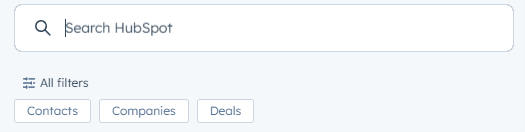
- From the drop-down options, select the appropriate company. The company’s page will open.
- In the upper right, select the name associated with it. The contact page will open.
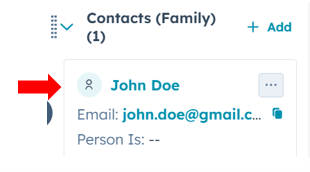
- In the left navigation menu, use the scroll bar to view the Membership card to verify his or her Group Role indicates the Group Role is an Admin (Group Administrator) or Representative (Authorized Representative).
Important: If an Authorized Representative or Group Administrator is also a REDEEM Member, you must work off the Sponsorship and Group Company pages when notating interactions addressing Sponsorship and Group Administration. Do not notate interactions on the personal pages of either the Authorized Representative or Group Administrator related to sponsorship or group sponsorship.
Understanding Both Contact Pages in HubSpot
The legend below describes the information found on both the Sponsorship Company page and the Group Sponsorship Child Company page in HubSpot.
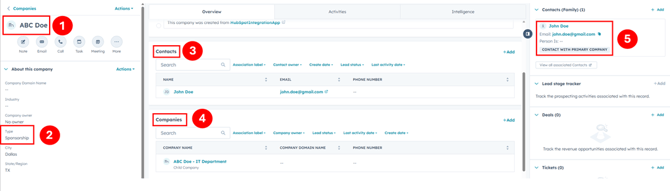
The screenshot above is the Sponsorship Company page showing important details about the group.
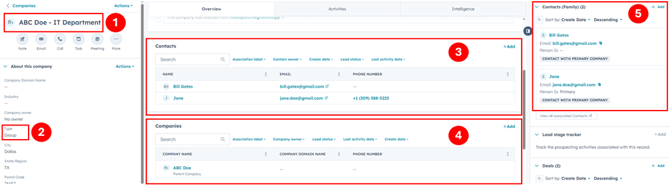
The screenshot above is the Group Sponsorship Child Company page showing important details about the group.
- The Companies section displays the Sponsoring incorporation or Sponsorship Group name.
- In the About this company section, Type indicates the membership is either Sponsorship or Group.
- The Contacts section shows the individual associated with the Sponsorship. This person might be the Authorized Representative or Group Administrator.
- The Companies section includes any Parent Company or Child Company associated with Sponsored Group.
- The Contact associated with the Sponsorship may also be an Authorized Representative. On a Group Sponsorship child company, there may be more than one Group Administrator listed on the Contacts card.
Tips
For related information see either:
- Verify Sponsorship Administrators in the Report Center of Sharable
- Verify Sponsorship Administrators in Sharable Groups