
Introduction
As a REDEEM® HealthShare member, you pay once a month. You make this payment when you fund your Share Wallet.
Funding your Share Wallet and sending your Share are related actions and together they make up the sharing process:
- Fund your Share Wallet (you have a choice to use either a manual option or an automatic option). For your convenience REDEEM® HealthShare recommends using the automatic option. For set up instruction, see Enable Auto Funding.
- Send your Share (which comes from the available balance in your Share Wallet and goes directly to a member in need). There is no automatic function for sending your share. For instruction, see Send Your Share.
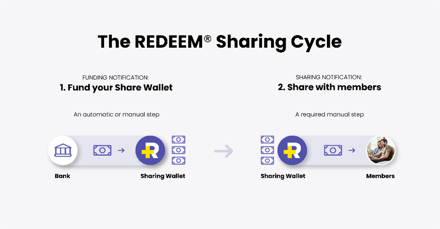
According to the Sharing Guidelines, not funding your Share Wallet or sending your Share on time might result in membership suspension. See Guidelines ‒ 5.2 Inactivation of Membership, 5.2.2 Involuntary Inactivation.
The ministry believes this process maintains the value of member-to-member sharing while providing an excellent method for that sharing.
Information
The comparison below summarizes how funding your Share Wallet differs from sending your Share.
| Feature | Funding Your Share Wallet | Sending Your Share |
| Purpose | Financial action. | Community action. |
| Amount | A set amount based on your membership level. | Amount will vary depending on your Share assignment. |
| How to complete the action. | You complete the action through either automatic funding or manual funding. | You complete the action manually through the Member Center. |
| Funds transfer | Uses a payment method such as a bank account or credit card to transfer funds to your Share Wallet for future sharing | Uses funds already available in your Share Wallet that you send to members with eligible medical bills. |
The video below provides an overview to help clarify the difference between funding your Share Wallet and sending your Share.
As a member of REDEEM HealthShare Ministry, reading and understanding the Sharing Guidelines is important.