
Introduction
If you choose FlexShare® add-on with your REDEEM® HealthShare program, you have the option to use it for medical bills that meet membership requirements. This article provides the information you need to include when you are ready to submit a FlexShare® bill.
Information
If the Explanation of Sharing (EOS) for a bill indicates all or part of a bill you submitted exceeded the sharing limit, then you may submit the bill or remaining charges to FlexShare add-on.
You must include the original bill and the EOS when you Submit a FlexShare® Bill. In the additional comments section, it is helpful to include that you would like to use your FlexShare add-on option for the remaining amounts.
It is your choice to use your FlexShare add-on dollars as you wish. Because of this, REDEEM HealthShare cannot move bills into a FlexShare submission on your behalf. You must submit the bill yourself.
Tips
Example EOS indicating member has surpassed allowable shareable amount. The information in the red box shows the amounts not eligible for sharing with the reason code. The yellow highlighted information defines the reason code. 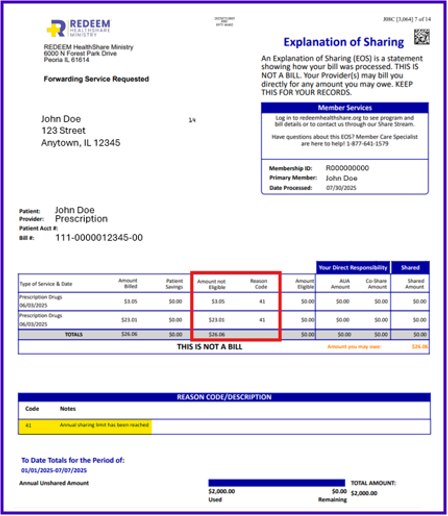
References
For more information about the types of bills ineligible for sharing, even with the FlexShare add-on option, see Guidelines 3.11 Not Eligible for Sharing.
As a member of REDEEM HealthShare Ministry, reading and understanding the Sharing Guidelines is important.