
Introduction
A medical bill includes itemized information like diagnostic and procedural codes explaining what care you or someone in your family received.
The healthcare industry often uses multiple terms interchangeably to describe a medical bill such as (not a comprehensive list):
- Superbill
- Itemized statement
- Patient ledger
- Account history
Regardless of the term, REDEEM HealthShare requires itemized details (described below) when you submit a bill. A medical bill differs from a common receipt. For consistency, this article uses the term, medical bill.
The information in this article is for submitting a medical bill only. See these other articles for:
Submission Options
The preferred method for bill submission is for you to present your member ID card to your provider at the time of service. Your provider can submit your bill electronically. He or she has up to 12 months to submit bills for processing from the date of service. Submitting a bill does not guarantee eligibility for sharing.
REDEEM HealthShare understands that 1) not all providers use an electronic system, 2) technical difficulties may arise when making the submission, or 3) you may have paid your medical bill directly to your provider. In those situations, you need to upload the medical bill and submit it through the Member Center.
Procedure
To upload your medical bill through the Member Center, follow these steps:
- Log in to the Member Center.
- In the Member Center navigation menu, select Medical Bills.
- Select Submit Bills. The Submit a Bill screen displays.
- Select Medical Bill.
- Complete the required fields.
- Select Next. The Additional Information screen displays.
- Complete the required and optional fields (providing information in the optional fields might reduce bill processing time).
- Select inside the Drag & Drop Documents here field to upload the bill and any additional documents you have. Your itemized bill must include:
- Name of member/patient
- Diagnosis/ICD10 Codes
- Procedure/CPT Codes
- Provider’s TAX ID
- Provider’s NPI
- Provider’s Billing Address
- Facility Service/Physical Address
- Date of Service
- Charged Amount(s)
- (if applicable) Patient Payment Receipt(s)
- (if applicable) Explanation of Benefits
- (if applicable) Any Provider Discounts Received
- Once you upload your bill successfully, select the acknowledgement checkbox.
- Select Next. An option to update your most recent prayer request will open.
- Type an updated prayer request
 Important: Do not select Cancel because this will cancel your submission.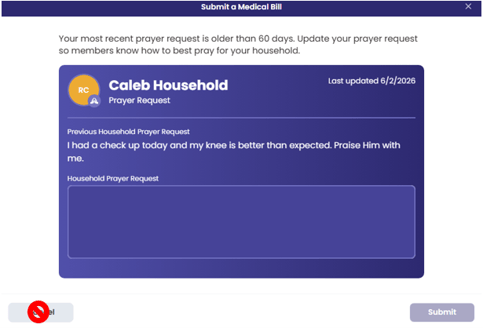
- Select Submit. A confirmation note will appear.